The 5 best pixel ruler Chrome extensions
For measuring a live page: element sizes, the gaps between things, and the padding you cannot see. Compared by what each one actually measures and where it gives up.
Design Toolkit or Dimensions for measuring between elements the way you would in Figma. Page Ruler Redux for dragging a rectangle over anything, including images. VisBug if you want to move things while you measure. All of them beat doing arithmetic on two bounding boxes in DevTools.
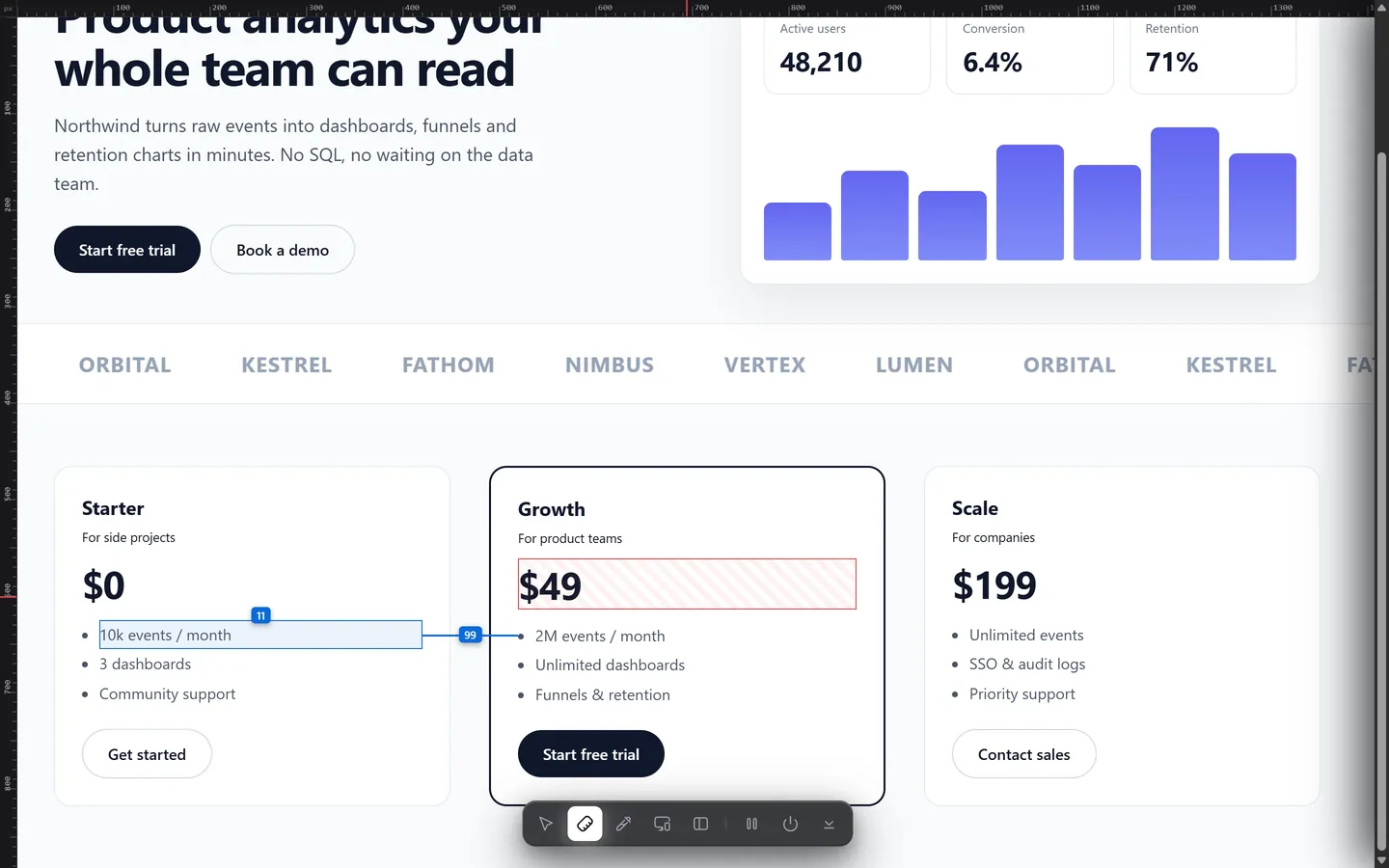
Two kinds of ruler, and it matters which you pick
Every tool here falls into one of two camps, and choosing the wrong one is why measurements disagree:
- Element rulers read the DOM. They know where a box ends because they asked the browser. They are exact, they survive zoom, and they can tell padding from margin — but they need real elements, so they cannot measure inside an image.
- Overlay rulers draw on top of the screen and measure what you drag. They work on anything, including a flat image or a PDF, but what they report is what your hand landed on.
For design work you almost always want the first kind. For "how wide is this thing in a screenshot", the second.
| Tool | Kind | Gap between elements | Box model | Works on images | Price |
|---|---|---|---|---|---|
| Design Toolkit | Element | Yes, any two | Yes | No | 7-day trial, then one-time |
| Dimensions | Element | Yes, nearest edges | No | No | Free |
| Page Ruler Redux | Overlay | Drag a rectangle | No | Yes | Free |
| VisBug | Element | Yes | Partly | No | Free, open source |
| Chrome DevTools | Element | Manual | Yes | No | Free, built in |
1. Design Toolkit
Design Toolkit Ours
Click one element, hover another, and the exact gap is drawn between them with its number — horizontally, vertically, or both at once. The box model overlay puts content, padding, border and margin on screen as separate bands, and page rulers along the top and left edges track the cursor when you want a coordinate rather than a distance.
- Distance between any two elements, not just neighbours
- Box model overlay: content, padding, border and margin, each with its number
- Pin a measurement and keep it while you look at something else
- Arrow keys walk to the parent or the child, so you can measure the box you meant
- Everything else is there too: type, colour, contrast, motion, responsive preview
Weak spot: DOM only. It cannot measure inside a screenshot, and it is paid after the trial.
2. Dimensions
Dimensions
A small, well-liked tool that does one thing cleanly: hold a key, move the cursor, and it shoots lines out to the nearest edges and labels the distances. For "is that gap 16 or 20", it is often the fastest answer on this list.
- Instant distances to the nearest edges in all four directions
- Element width and height as you hover
- Free, tiny, no setup
Weak spot: it measures to whatever edge is nearest, which is not always the edge you meant, and there is no way to pick two specific elements. No box model, no padding versus margin.
3. Page Ruler Redux
Page Ruler Redux
The classic overlay ruler, revived. Drag a rectangle anywhere on the page and read its width, height and position. Because it draws on top rather than reading the DOM, it measures things that are not elements at all — a logo inside an image, a region of a PDF, a gap in a screenshot.
- Drag a measuring rectangle over anything
- Width, height and coordinates as you resize it
- Element mode to snap the rectangle to a box
Weak spot: what you measure is where you dragged. For exact spacing between two components, an element ruler is both faster and right.
4. VisBug
VisBug
Google's open-source design-tools overlay measures as part of a bigger job: it lets you edit the live page. Inspect a box, see its metrics, then nudge the padding and watch the layout react.
- Measurement alongside live editing
- Guides and alignment checks
- Free and open source
Weak spot: measuring is not its focus, and nothing you do survives a reload.
5. Chrome DevTools
Chrome DevTools
Hover an element with the inspector and Chrome draws its box model with content, padding, border and margin colour-coded, and shows the size in a tooltip. For one element it is excellent and it is already installed.
- Accurate box model overlay for a single element
- Exact computed dimensions in the Computed tab
- No install, works everywhere
Weak spot: there is no "distance between these two things" in DevTools. You read two bounding boxes and subtract, every time.
What most people are actually measuring
Almost every measurement in design work is one of three questions, and it is worth knowing which one you are asking:
- "Is this aligned?" — you want coordinates, so page rulers or an overlay.
- "Is this gap consistent?" — you want element-to-element distance, repeatedly, across a page.
- "Where does this space come from?" — you want the box model, because 24px of padding and 24px of margin look identical and break differently.
The third one is where most tools stop, and it is usually the one that explains why your rebuild is off.
Measure it the way you would in Figma
Click one element, hover another, read the gap. Plus the box model, type, colour and motion. Free for 7 days.
Add to Chrome — free trialCommon questions
Why do two rulers report different numbers for the same gap?
Because they measure different edges. One measures from the border box, another from the visible text, another from the margin edge. A 24px gap between two boxes is not the same as 24px between the words inside them — neither tool is wrong, they are answering different questions.
Does browser zoom change the measurements?
It should not. A tool reading CSS pixels reports the same number at any zoom, because CSS pixels are what the layout is built in. A tool measuring screen pixels will drift with zoom and with the device pixel ratio.
Can I measure the space inside an element, not just around it?
Yes, with a box model overlay. It draws content, padding, border and margin as separate bands with their own numbers — which is how you tell a 24px padding from a 24px margin.
Can these measure an image or a PDF?
Only an overlay ruler can, and only roughly. Anything that reads the DOM needs real elements, so a flat image has nothing to read.