How to give your AI the real design of a web page
A screenshot makes a model guess at every number. Here is how to hand it the measured ones instead — and how to check afterwards whether the rebuild actually matches.
Point at the element, press Send to AI, and your agent receives the measured values behind it: box model, layout, typography, colours with contrast, hover and focus changes, and the animation timings a picture cannot carry. Then send your rebuilt version back the same way and compare the two — the gaps come back as numbers, not opinions.
Why a screenshot is the wrong input
Paste a screenshot into any model and ask for the code. What comes back is usually close: the right shape, roughly the right proportions, a colour that looks about right. Then you put the two side by side and the differences start.
They are always the same differences, because they are always the same missing numbers:
- Padding and gaps. A picture shows a distance in screen pixels. It does not say whether that gap is
24px,1.5remor a percentage that changes with the viewport. - Type. Weight 500 and weight 600 look similar in a screenshot and nothing alike on a page. Letter spacing of
-0.02emis invisible until it is missing. - Where a width comes from. A button 537px wide might stretch to fill its column or hug its label. Both look identical in a still frame and behave completely differently.
- Hover and focus. Nothing about them is in the picture at all.
- Motion. A still frame has no duration, no easing curve and no keyframes. This is the one that cannot be recovered by looking harder.
None of this is a failure of the model. You gave it a picture and asked it to infer a stylesheet; it inferred one. The fix is to stop making it guess.
1. Point at what you want
Open the page, press Alt+R, and click the section, card or button. A whole section works as well as a single element — the capture covers what is inside it too, each child with its own type, colour, spacing and hover.
2. Send it
Press Send to AI. Two things can happen, and both work:
- With a coding agent connected — Claude Code, Cursor, Windsurf, VS Code or anything else that speaks MCP — the capture goes straight to it, and you just ask.
- With nothing installed the same measurements are copied to your clipboard as a brief. Paste it into ChatGPT, Claude or Gemini. No terminal, no Node, no setup.
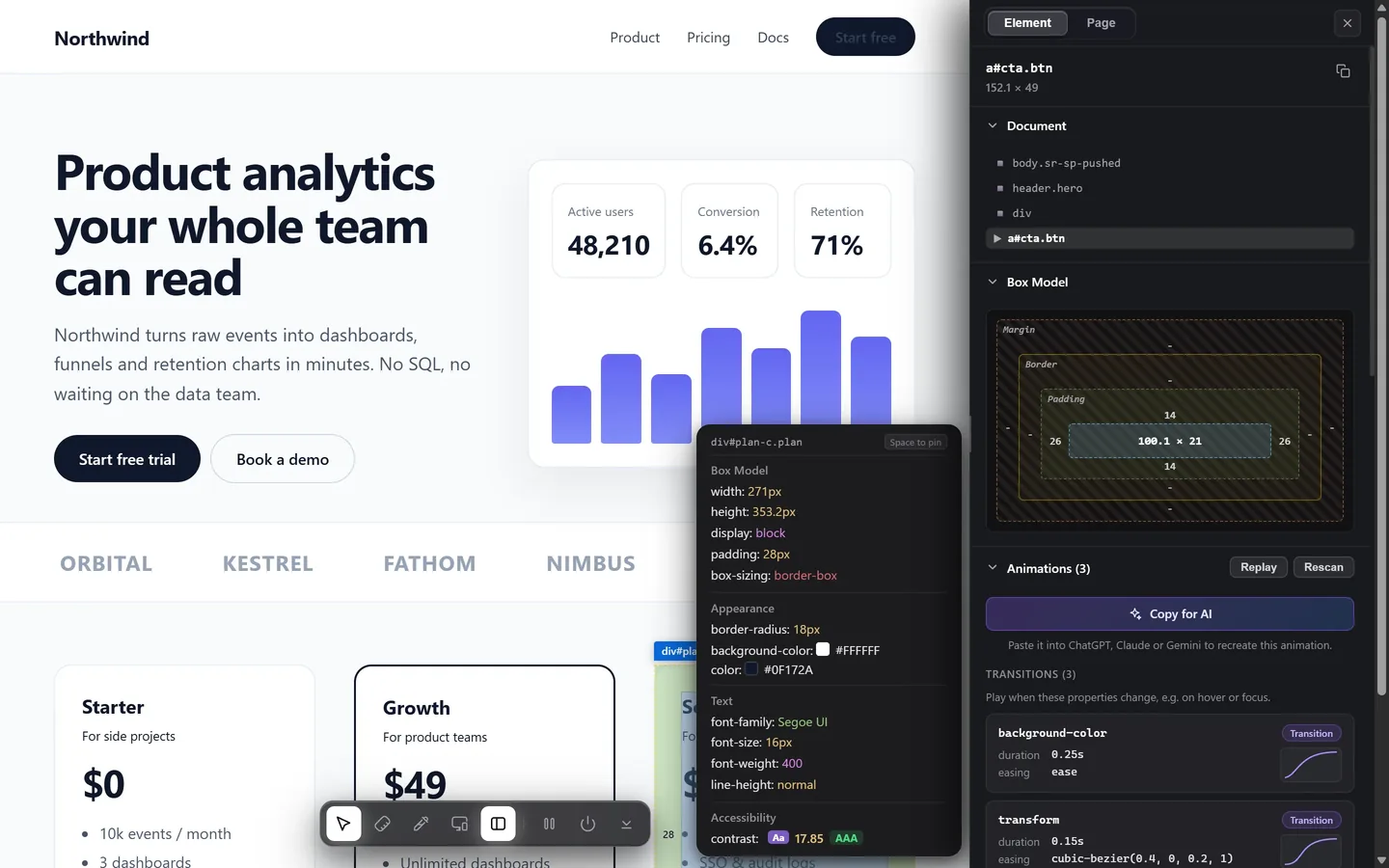
3. Ask for the rebuild
"Rebuild the element I just sent, in React and Tailwind." What the agent reads looks like this:
# section#hero — 1247px × 578px
Layout: flex column, gap 48px, align center, padding 64px 40px
Written as: max-width: 68rem; margin: 0 auto

Inside:
h2.title — 44px/1.15, weight 700, tracking -0.88px · #0a0a0a
           css: font-size: clamp(28px, 3.5vw, 44px); max-width: 62%
div.figures — flex row, gap 64px · css: width: 100%
  div.figure ×4 — flex column, gap 6px, align center · flex 1 1 0
a.cta — full width of its container · padding 14px 28px · radius 999px
        hover: background-color #101828 → #344054 over 0.16s ease
Three things in there are the whole point. clamp(28px, 3.5vw, 44px) is the rule behind the number, so the rebuild holds at every width instead of one. ×4 says four identical columns, so the agent writes one and repeats it. And full width of its container is the difference between a button that stretches and a button that hugs — which a screenshot can never settle.
4. Check the rebuild, don't eyeball it
This is the step most people skip, and it is the one that turns "close" into "done". Render what the agent built, capture your version the same way, and compare the two. The answer is a list:
# 3 differences
padding: 14px 24px  →  14px 20px
fontSize: 44  →  40
motion transition background-color: 0.16s ease  →  0.2s ease
Now the agent has something to act on. Two rounds of that and the difference list is empty — which is a verifiable claim, not a feeling about a screenshot.
What about the font?
Usually the font belongs to the site. You cannot use it and you should not try.
What travels instead is its measurements, taken on the page where it really is loaded: x-height, cap height, the width a fixed string sets at the size the page uses it. Those numbers let an agent pick a family it can actually load and tune it — font-size-adjust takes the x-height ratio, letter spacing closes the rest of the width — until the two set the same. That is how a substitute stops being a guess. See how to find what font a website uses for the details.
How this compares to Figma's MCP
Figma's Dev Mode MCP hands an agent the design file: the components, the variables, the intent. That is genuinely useful when the design exists in Figma and you are building it for the first time.
It cannot help you with a page that is already live. A shipped page has its own truth — what the CSS actually resolved to, what the browser actually painted, what the transitions actually run at — and often no Figma file at all, or one that stopped matching six releases ago. Measuring the live page answers a different question, and it is the one you have when the thing you want to rebuild is already on the internet.
Stop pasting screenshots
Point at an element, press Send to AI, and let it work from the numbers. Free for 7 days, then a one-time payment.
Add to Chrome — free trialCommon questions
Why can't an AI just rebuild a design from a screenshot?
A screenshot carries no numbers. Padding, line height, letter spacing, easing and hover states are not in the pixels, so a model infers them, and small errors compound until the rebuild resembles the original without matching it. Motion is worse: a still frame contains no duration, no easing and no keyframes at all.
Do I need to install anything?
No. With no agent connected, Send to AI copies the same measurements as a brief you can paste into ChatGPT, Claude or Gemini. Connecting a coding agent over MCP skips the paste; it is an upgrade, not a requirement.
What is MCP, and is my browser exposed to the agent?
The Model Context Protocol is how coding agents connect to outside tools. The bridge here runs on your own machine and only ever holds captures you deliberately sent. There is no tool an agent can call to ask your browser for a page, and nothing leaves your computer.
Does it work on a whole section, or only one element?
A whole section. The capture covers what is inside it — each child with its own size, type, colour, spacing and hover — so a header arrives with its nav, its links and its buttons, not just its outline.